How Blind and Visually Impaired People Use iPhones: Accessibility Features That Make Everyday Life Easier

A train platform changes suddenly at King’s Cross station in London.
Most commuters glance at the departure board for a second and continue walking without thinking twice.
But for many blind and visually impaired people (VIPs), moments like these can feel very different.
A missed platform update could mean boarding the wrong train.
An inaccessible transport app might make it difficult to check directions quickly.
A restaurant QR code menu may not work properly with a screen reader.
A payment machine with poor contrast can suddenly become stressful in a crowded environment.
These are small moments most people rarely think about.
But together, they quietly shape how accessible everyday life feels.
That is why smartphone accessibility matters.
Not because technology removes disability.
And not because apps replace human support.
Accessible technology can reduce friction in everyday life, helping visually impaired people navigate, communicate, travel, and access information more independently.
Over the last decade, smartphones have become one of the most important accessibility tools that many blind and visually impaired people use every day. Among those devices, the iPhone has become especially well known for its accessibility ecosystem and built-in assistive technology features.
This article explores how blind and visually impaired people use iPhones in daily life, the accessibility features that make a difference, and why accessible technology is becoming increasingly important in modern society.
Why Smartphone Accessibility Matters More Than Ever
Modern life increasingly depends on screens.
Checking train times.
Booking taxis.
Ordering food.
Reading bank notifications.
Navigating unfamiliar streets.
Accessing healthcare information.
Using public transport apps.
Scanning QR codes.
Many everyday services now assume people can quickly interact with digital interfaces.
For visually impaired people, that creates both opportunities and barriers.
According to the World Health Organisation, more than 2.2 billion people globally live with some form of vision impairment or blindness. As more services become digital-first, accessibility is no longer a “nice addition”; it directly affects how independently people can move through everyday life.
For many years, accessible technology often meant expensive specialist equipment:
- standalone screen readers
- dedicated magnifiers
- braille devices
- specialist GPS systems
- assistive hardware costing thousands of pounds
Smartphones changed that dramatically.
Instead of carrying multiple devices, many visually impaired users could suddenly access:
- screen readers
- magnification tools
- voice assistants
- navigation support
- object recognition
- braille compatibility
- speech tools
from a single phone in their pocket.
That shift mattered far beyond convenience.
Accessible technology became more integrated into ordinary life instead of feeling separated into “specialist systems.”
Why Many Blind and Visually Impaired People Prefer iPhones
One reason many visually impaired users prefer iPhones is consistency.
Historically, accessibility experiences across smartphones were often uneven. Some devices lacked reliable screen readers. Others offered limited accessibility integration across apps and system settings.
Apple approached accessibility differently by building accessibility tools directly into the operating system itself.
That means features like:
- VoiceOver
- Magnifier
- Zoom
- Spoken Content
- braille support
- display customization
- voice controls
are integrated directly into the iPhone experience rather than treated as optional add-ons.
Over time, this helped create trust among many blind and visually impaired users.
Accessibility organisations and blindness communities have repeatedly highlighted the popularity of iPhones among screen reader users because of the reliability of features like VoiceOver and Apple’s long-term accessibility support.
However, accessibility conversations should remain balanced and honest.
iPhones are not perfect accessibility devices.
Cost remains a major barrier for many people.
Some third-party apps still fail accessibility standards completely.
Updates occasionally create accessibility frustrations.
And many visually impaired people still rely on human assistance in certain situations.
Accessibility is never solved by one device alone.
But accessible technology can still meaningfully reduce barriers in everyday life.
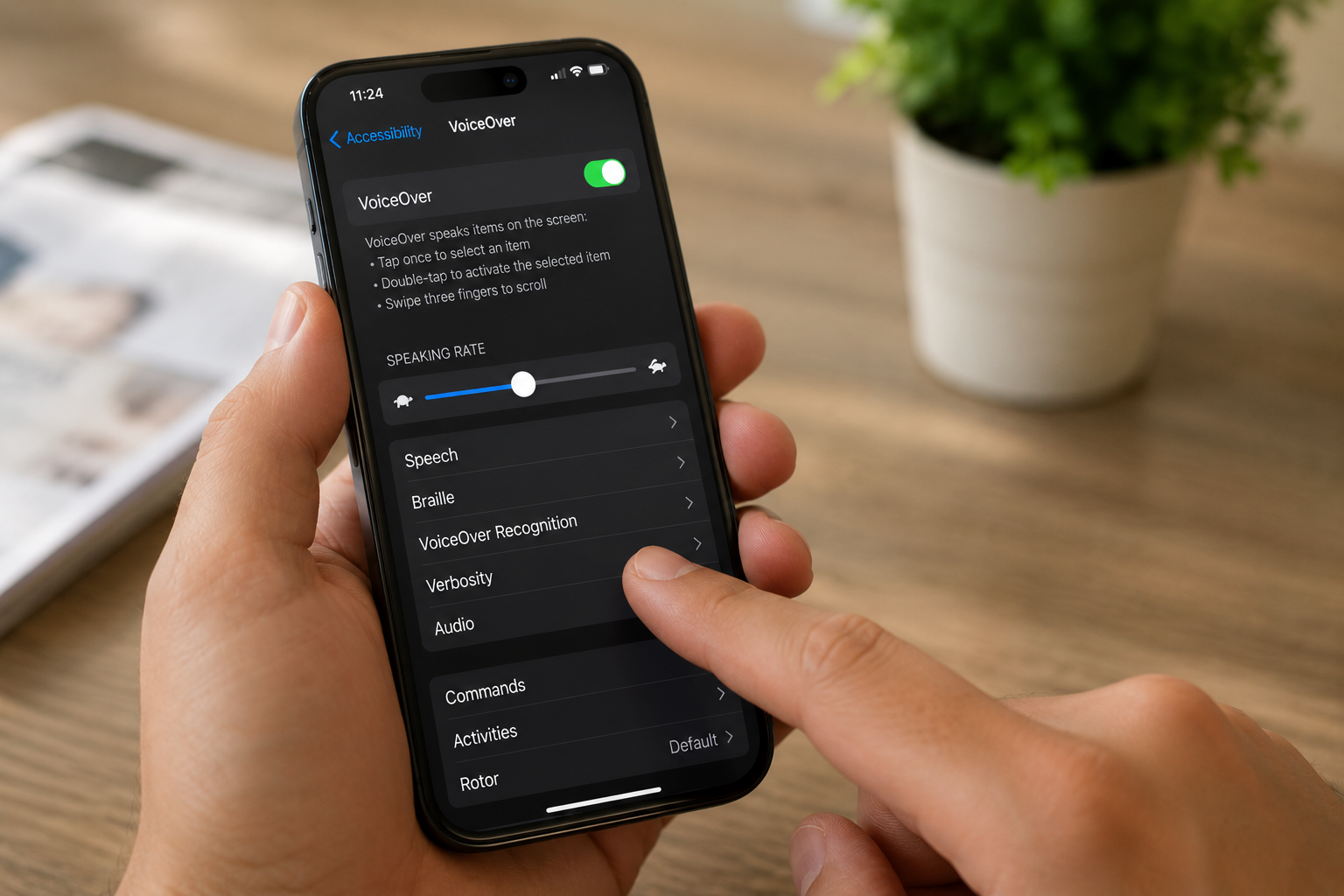
VoiceOver: The Feature That Changed Smartphone Accessibility
For many blind users, VoiceOver completely changed how smartphones could be experienced.
VoiceOver is Apple’s built-in screen reader that reads aloud what appears on the screen while allowing users to navigate using gestures, touch feedback, and audio interaction.
But VoiceOver is far more than simple text-to-speech.
A sighted person may unlock a phone and visually scan the screen within seconds. Many blind users navigate differently, building an understanding of layouts through sound, gestures, rhythm, and memory.
Instead of visually locating buttons or menus, users can:
- hear options spoken aloud
- explore apps through touch gestures
- send messages independently
- browse websites
- check emails
- use banking apps
- navigate transport systems
- access maps and directions
For experienced users, this interaction can become incredibly fast and intuitive.
And importantly, VoiceOver exists within a mainstream smartphone used by millions of people globally. That helped accessibility feel more integrated into everyday technology instead of existing separately from it.
For visually impaired commuters navigating busy areas like the London Underground, features like VoiceOver can make real-world travel feel more manageable, especially when combined with accessible transport apps and audio navigation tools.
iPhone Accessibility Features That Help Visually Impaired Users Every Day
While VoiceOver is one of the most well-known accessibility tools, many blind and visually impaired people rely on a combination of iPhone accessibility features throughout the day.
Magnifier
The Magnifier app allows users with low vision to zoom into nearby objects and text using the iPhone camera.
Many visually impaired users use Magnifier to:
- read restaurant menus
- Check expiry dates while shopping
- view medication labels
- zoom into train information boards
- access printed documents more independently
In busy environments, even small accessibility improvements can reduce stress significantly.
Siri and Voice Commands
Voice assistants can help visually impaired users interact with technology more naturally.
Using Siri, users can:
- send messages
- make phone calls
- set reminders
- check directions
- Ask for transport updates
- open apps hands-free
For some users, voice interaction reduces the need to navigate visually complex interfaces.
Zoom and Display Customisation
Not all visually impaired people are blind.
Many people with low vision benefit from:
- larger text sizes
- increased contrast
- colour filters
- reduced transparency
- display zoom settings
These features can make digital content easier to read and reduce visual fatigue throughout the day.
Spoken Content
Spoken Content allows the iPhone to read selected text aloud.
This can help users:
- listen to articles
- review documents
- access websites more comfortably
- consume information without visual strain
For some users, audio accessibility creates a more comfortable experience than constantly magnifying text.
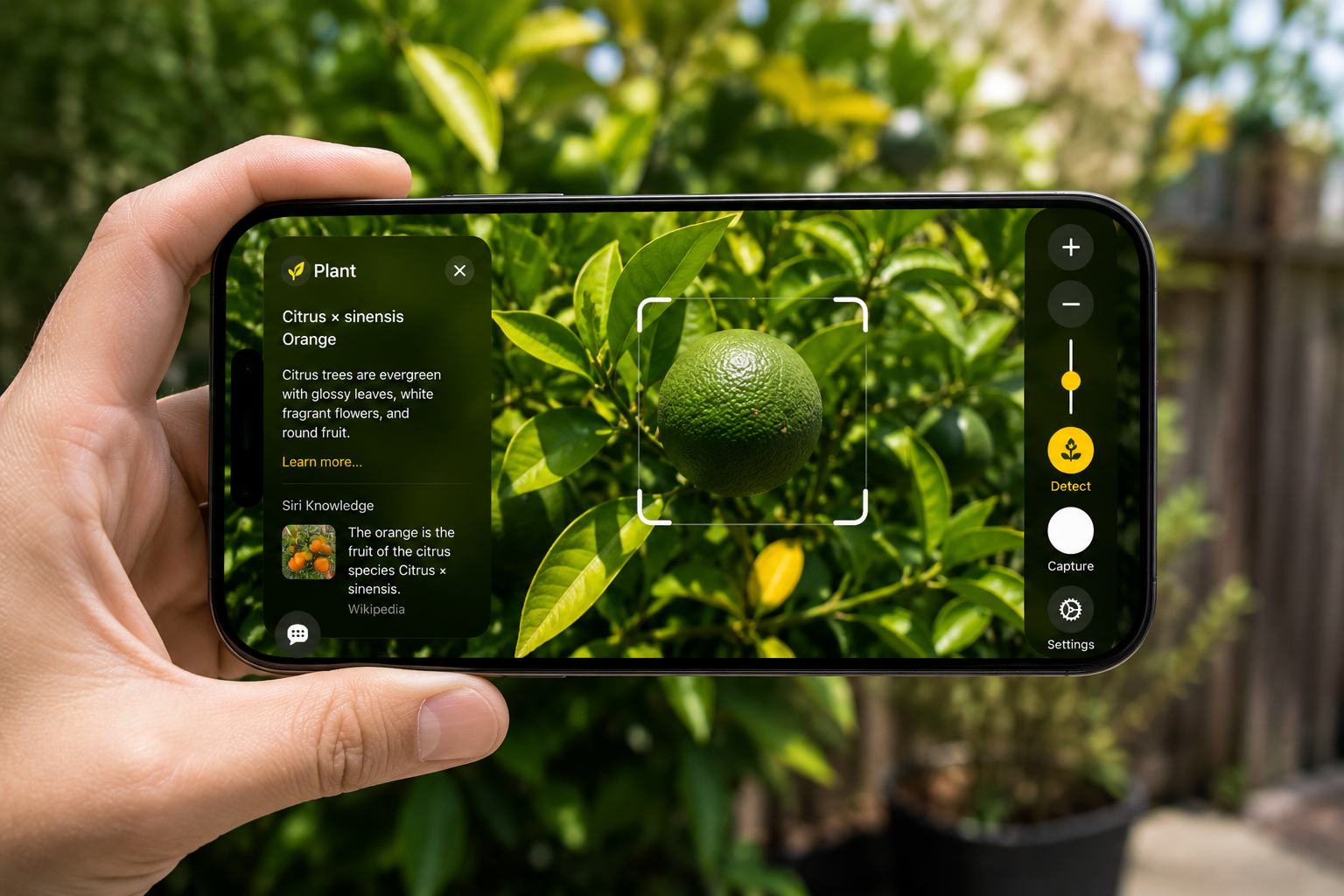
Live Recognition and Object Detection
Newer accessibility tools increasingly focus on environmental awareness.
Using AI-powered recognition features, visually impaired users can:
- identify nearby objects
- detect doors and people
- recognise text in physical environments
- understand surroundings more clearly
The iPhone camera has quietly become one of the most important accessibility tools many visually impaired people rely on daily.
How Blind and Visually Impaired People Use iPhones in Everyday Life
Accessibility is often discussed in technical terms.
But for many visually impaired people, accessibility is experienced through ordinary situations.
A commuter navigating London may use an iPhone to:
- check whether a train platform has changed
- hear live transport updates
- access walking directions
- identify ride-share pickup locations
- communicate while travelling independently
Someone with low vision may use accessibility tools to:
- read food packaging
- identify medication instructions
- enlarge restaurant menus
- zoom into public signage
- access banking information
Students may rely on iPhone accessibility features to:
- enlarge lecture notes
- dictate assignments
- listen to study materials aloud
- organise schedules more independently
Accessibility becomes meaningful when it reduces dependency in ordinary life.
Because often, the biggest accessibility barriers are not dramatic moments.
They are small daily frustrations repeated over and over again.
The Hidden Stress of Inaccessible Digital Experiences
Despite major progress in accessible technology, accessibility barriers still exist across the digital world.
Many websites remain difficult for screen readers to navigate.
Restaurant QR code menus are frequently inaccessible.
Transport apps do not always communicate disruptions clearly.
Banking apps sometimes break accessibility compatibility after updates.
Even AI-powered accessibility tools still make mistakes.
Object recognition systems can misidentify environments.
Automatic image descriptions may miss important details.
Voice systems can struggle in noisy public spaces.
This is important to acknowledge honestly.
Because accessibility is not solved by one app, one company, or one device.
Accessibility requires:
- inclusive design
- accessible development
- real-world user testing
- public awareness
- continuous improvement
And importantly, accessibility improves most when blind and visually impaired people are actively involved in the design process itself.
How AI Is Changing Accessibility Technology
One of the biggest changes happening in accessibility technology today is environmental understanding.
Earlier accessibility tools mainly helped users interact with screens.
Newer tools increasingly help users interpret the world around them.
AI-powered accessibility systems are becoming more capable of:
- recognising environments
- identifying objects
- understanding scenes
- describing surroundings
- supporting real-time navigation
This shift is influencing how accessible travel technology is being designed across cities like London.
The future of accessibility is moving toward more context-aware support that helps visually impaired people travel more confidently and independently in unfamiliar environments.
Apple’s Latest Accessibility Updates Show Where Technology Is Heading
Apple has also recently announced new accessibility updates focused on AI-powered environmental awareness, improved reading support, and smarter screen interaction for blind and visually impaired users.
One of the most notable additions is Accessibility Reader, designed to improve readability through customizable:
- fonts
- spacing
- contrast
- colour presentation
Apple is also expanding tools that support:
- object recognition
- scene understanding
- contextual awareness
- more detailed image descriptions through VoiceOver
These updates reflect a wider shift happening across accessibility technology:
moving beyond simple screen interaction and toward real-time environmental support that helps visually impaired users navigate everyday life more confidently and independently.
How Travel Hands Is Thinking About Accessibility
At Travel Hands, accessibility is not viewed simply as a feature checklist.
It is about understanding how visually impaired people experience movement, navigation, uncertainty, and independence in real environments.
That thinking has influenced the development of VIPA, Visually Impaired People’s Assistant, Travel Hands’ latest accessibility innovation, designed to support more accessible, human-centred travel experiences for VIPs across London.
Rather than focusing only on technology itself, VIPA has been designed around real-world travel experiences:
- navigating unfamiliar routes
- understanding surroundings
- reducing travel anxiety
- accessing information more confidently
Importantly, the systems and accessibility experiences developed by Travel Hands are guided by WCAG accessibility principles and tested directly with members of the VIP community.
Because accessibility becomes far more meaningful when visually impaired users are included throughout the design process, not simply added at the end.
Accessibility Benefits More People Than Most Realise
One of the biggest misconceptions about accessibility is that it only benefits disabled users.
In reality, many technologies now considered mainstream originally evolved from accessibility-focused innovation.
Examples include:
- voice assistants
- captions
- predictive text
- voice dictation
- audio descriptions
Accessibility often improves technology for everyone.
That is why inclusive design matters beyond compliance requirements or corporate messaging.
It improves how people experience everyday life.
The Bigger Shift Is About Independence
The story of iPhone accessibility is ultimately not about smartphones.
It is about reducing barriers in everyday life.
For many blind and visually impaired people, accessible technology can help create:
- greater independence
- safer navigation
- easier communication
- quicker access to information
- more confidence while travelling
Not perfect independence.
Not barrier-free living.
But meaningful improvements in how people move through the world every day.
And often, those improvements come from smaller moments:
- reading a message independently
- navigating a station more confidently
- hearing directions clearly
- identifying medication safely
- accessing information without relying on someone else
That is where accessible technology becomes genuinely transformative.
Because accessibility is rarely about one dramatic innovation.
It is about making everyday life feel a little less difficult.
Be a part of

